

 Weighing Scale
  Moisture Analyzers
  CAS Weighing Scale
  Aczet Weighing Machines
  Adam Equipment
  Sartorius
  Mettler Toledo
  Essae Weighing Scales





Remote Display Solutions for Essae DX‑415 Weighing Scale | Essae Remote Display
 By Manish Sharma 3 months ago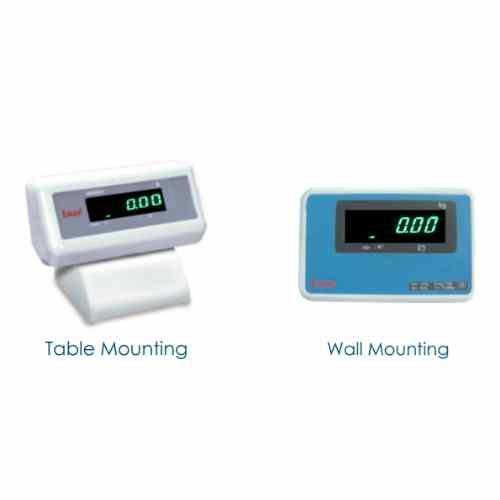
Why a Remote Display Matters
In industrial and retail weighing environments, the weighing indicator is often placed at the operator’s side, but the reading needs to be visible to customers, supervisors, or crane operators. A remote display bridges that gap – it duplicates the weight reading on a larger, bright LED screen at a distance, improving transparency, efficiency, and safety.
Essae‑Teraoka offers two purpose‑built remote display variants for the DX‑415 model, each designed for a specific mounting scenario.
1. U20491 – Remote Display Assy (Green LED Wall) – 5 Metres
Best for: Overhead visibility, wall‑mounted viewing, industrial floors, and check‑weighing stations.
| Feature Category | Specification Details |
|---|---|
| Compatible Model | Essae DX-415 and compatible weighing systems |
| LED Display Colour | High-brightness green LED for excellent visibility, even in bright ambient lighting |
| Cable Length | 5 metres, allowing flexible installation away from the weighing indicator |
| Mounting Type | Wall-mount design suitable for installation on walls, pillars, columns, or overhead structures |
| Primary Purpose | Enables operators, supervisors, quality control personnel, and customers to view weight readings clearly from a distance without crowding the weighing station |
Key Benefits
- Enhanced safety – Operators don’t need to shout or walk over to check readings.
- Increased throughput – Quick visual verification speeds up loading, batching, and packing lines.
- Durable construction – Built for factory floor conditions with robust housing.
- Plug‑and‑play – Connects directly to the DX‑415 indicator with minimal setup.
Ideal Use Cases
- Packing lines where the display is mounted above the conveyor.
- Receiving/despatch gates where the indicator is kept inside a cabin but the display faces the loading bay.
- Check‑weighing stations where quality inspectors need a clear view from their inspection table.
2. 24837 – Common Remote Display (Green LED Table)
Best for: Desk‑top, counter‑top, or portable placement where the display sits on a flat surface.
| Feature Category | Specification Details |
|---|---|
| Compatible Model | Essae DX-415 |
| LED Display Colour | High-brightness green LED for clear, fatigue-free viewing during extended operation |
| Mounting Type | Table-top / counter-top design with a stable self-standing base |
| Placement | Portable design that can be easily moved between workstations or positioned beside the operator for a convenient secondary weight display |
Key Benefits
- Flexible positioning – Unlike the wall unit, this can be placed anywhere on a bench, desk, or counter.
- Perfect for retail/counter sales – Place it facing the customer so they can see the exact weight of their purchase, building trust and transparency.
- Space‑saving footprint – Compact design fits even on crowded worktables.
- Easy to relocate – Ideal for multi‑station environments where the display needs to move with the operator.
Ideal Use Cases
- Retail counters (grocery, jewellery, pharmaceutical dispensing) – customer‑facing display.
- Laboratory or testing benches where the indicator is tucked away but the display sits alongside samples.
- Temporary weighing stations where equipment is frequently rearranged.
U20491 vs 24837 – Quick Comparison to Choose the Right One
| Criteria | U20491 (Wall Mount, 5 m Cable) | 24837 (Table-Top Display) |
|---|---|---|
| Mounting | Fixed wall or overhead installation | Free-standing on any flat surface |
| Cable | 5-metre cable for extended installation reach | Standard cable length for table-top placement |
| Best Environment | Factories, warehouses, manufacturing units, and large platform scales | Retail counters, laboratories, offices, and small workstations |
| Visibility Angle | Best when mounted above eye level for long-distance viewing | Best when positioned at eye level on a desk or counter |
| Permanent vs. Portable | Semi-permanent installation | Fully portable and easy to relocate |
Compatibility Note
Both accessories are exclusively designed for the DX‑415 model. If you are using other Essae models (DS‑215 series, DX‑451, SI‑850, etc.), they have their own dedicated remote display variants (which we will cover on later days). Always verify model compatibility before ordering.
Installation & Setup Tips
- Cable routing – For the wall unit (U20491), plan the cable path along walls or conduits to avoid tripping hazards.
- Power – Both displays draw power from the indicator itself; no external adapter is needed.
- Cleaning – Use a soft, dry cloth for the LED panel. Avoid water or solvents near the connector pins.
Why Add a Remote Display to Your DX‑415?
- Transparency – Customers or auditors can see the weight without questioning the operator.
- Efficiency – Reduces repeated communication (“What does it show?”).
- Ergonomics – Operators don’t have to twist their necks to see the indicator, reducing strain.
- Professional appearance – A dedicated external display elevates the overall setup of your weighing station.
Categories
Trending Now