

 Weighing Scale
  Moisture Analyzers
  CAS Weighing Scale
  Aczet Weighing Machines
  Adam Equipment
  Sartorius
  Mettler Toledo
  Essae Weighing Scales





2‑Color & 3‑Color Tower Lamp Visual Indicators for Weighing and Process Control Systems
 By Manish Sharma 2 months ago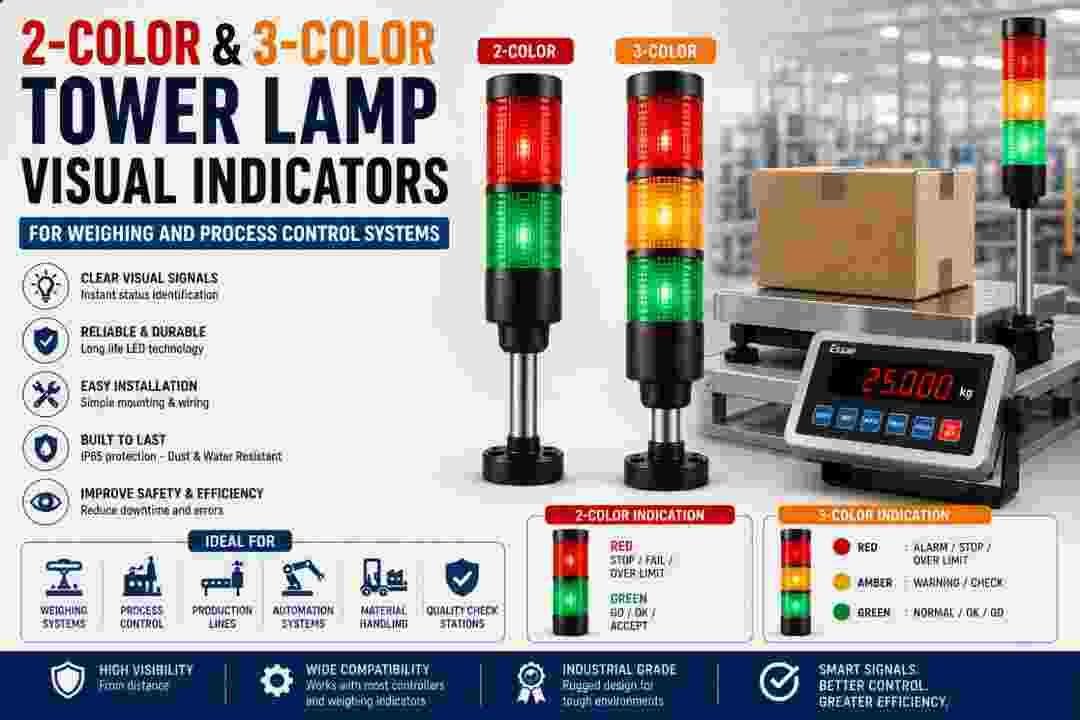
Why Visual Signal Lights are Essential in Weighing Operations
In busy industrial environments, workers cannot always stop to read a digital display. When a filling line is running at high speed, or when a forklift operator is approaching a scale from a distance, they need an instant, unmistakable signal that tells them the status of the weighing process—without having to interpret numbers.
Tower lamps, also known as stack lights or signal towers, provide exactly that. These rugged, highly visible LED light stacks mount directly onto or near the weighing console and illuminate in different colours to indicate specific conditions. Whether it's "weight accepted," "over tolerance," "under tolerance," or "filling in progress," a tower lamp communicates the message instantly across the entire work area.
Accessory 1: 3‑Color Tower Lamp Kit for SI‑850 (U25521)
This is a comprehensive, pre‑assembled tower lamp kit specifically configured for the SI‑850 weighing console. It features a three‑tier LED stack—typically Red, Amber (Yellow), and Green—that provides clear, colour‑coded status indication for a wide range of process applications.
Key Features & Benefits:
- Three Distinct Status Indicators: The three colours allow you to assign different meanings to each light. The most common configuration uses Green for "Accept" or "Within Tolerance," Amber/Yellow for "Warning" or "Near Target," and Red for "Reject," "Over Tolerance," or "Alarm." This multi‑colour system provides nuanced communication, not just a binary pass/fail.
- Bright, Long‑Life LEDs: Unlike traditional incandescent bulbs, these LEDs are highly energy‑efficient, generate minimal heat, and have an exceptionally long operational life—often exceeding 50,000 hours. They remain bright and clear even in high‑ambient‑light factory conditions.
- Pre‑Wired & Ready to Install: The kit comes complete with the necessary cable and connector to interface directly with the SI‑850's dedicated output ports. This eliminates the need for custom wiring, reducing installation time and the risk of electrical errors.
- Audible Alarm Option (depending on variant): Some tower lamp configurations include a built‑in buzzer that sounds when a specific colour lights up (usually Red). This adds an audio layer to the visual warning, ensuring that even if an operator isn't looking at the tower, they can hear that action is required.
- Robust Industrial Housing: The tower lamp is built from impact‑resistant materials and sealed against dust and moisture, making it suitable for harsh factory floors, warehouses, and even outdoor under‑cover applications.
Ideal Use Cases:
- Filling & Batching: Green = Filling complete and within target weight. Amber = Approaching target, slow down fill speed. Red = Overfilled, automatic reject or alarm.
- Check‑Weighing Stations: Green = Item passes quality check. Amber = Weight is borderline (needs manual inspection). Red = Item fails.
- Sorting Lines: Different colours direct items to different chutes or conveyors based on weight category.
- Multi‑Stage Processes: Track the progress of a multi‑step weighing or mixing process, with each colour representing a different stage.
Accessory 2: 2‑Color Tower Lamp Kit for SI‑850 / DC‑810 (U22285)
For applications where a simpler, binary status indication is sufficient, the 2‑Color Tower Lamp Kit provides a streamlined solution. This two‑tier LED stack (typically Red and Green, or Red and Amber) offers a clear, unambiguous "Go / No‑Go" or "Pass / Fail" signal.
Key Features & Benefits:
- Simplified Decision‑Making: With only two colours, the operator's decision is binary. There is no ambiguity—the load either passes or fails, or the process is either ready or not ready. This speeds up reaction times in high‑throughput operations.
- Cost‑Effective & Compact: With one fewer light tier, this kit is more affordable and has a slightly smaller footprint, making it ideal for space‑constrained workstations or when budget is a primary consideration.
- Dual Compatibility: This kit is designed to work with both the SI‑850 and the DC‑810 consoles, making it a versatile stock item for facilities that operate multiple different scale models.
- Quick Visual Confirmation: In busy environments, a single colour change can be recognized from across the room. Green means proceed; Red means stop and investigate. This simplicity reduces training time for new operators.
- Same Robust Construction: Like the 3‑color kit, the 2‑color version is built with durable, long‑life LEDs and a protective housing that withstands industrial conditions. It also includes the necessary cabling for plug‑and‑play connectivity.
Ideal Use Cases:
- Simple Pass/Fail Check‑Weighing: Items are either within tolerance (Green) or out of tolerance (Red). This is common in packaging lines where only two outcomes are possible.
- Load Ready Indication: Green means the scale has stabilized and is ready to accept the next load. Red means the scale is still settling or the load is in motion.
- Operator Guidance: In manual pick‑and‑pack operations, a green light tells the operator to proceed to the next task, while a red light indicates a pause or error condition.
2‑Color vs 3‑Color: Which One Do You Need?
| Factor | 2-Color Tower (U22285) | 3-Color Tower (U25521) |
|---|---|---|
| Number of Indicators | Two indicators, typically Red + Green | Three indicators, typically Red + Amber + Green |
| Typical Application | Simple Pass/Fail, Go/No-Go, and On/Off indication | Warning, Standby, Intermediate, and multi-stage process indication |
| Complexity | Simple and fast to interpret | More detailed process-status indication |
| Compatibility | SI-850 & DC-810 | SI-850 only |
| Best For | High-speed checkweighing and simple tolerance checks | Filling lines, batching, multi-stage processes, and quality grading |
| Main Advantage | Quick visual status recognition | Provides an additional status level for better process control |
Decision Guide:
- Choose the 2‑Color Tower if your process has exactly two outcomes (e.g., accept/reject) and you need a low‑cost, universal solution that works across different console models.
- Choose the 3‑Color Tower if your process has an intermediate state (e.g., near‑target warning, standby, or process‑in‑progress) and you need more granular status information. It is the preferred choice for filling and batching applications where a "slow down" warning saves product giveaway.
How Tower Lamps Integrate with Your Weighing System
The tower lamp is not just a passive light. It is an output device that is driven by the weighing console's internal logic.
- The console receives the weight signal from the load cells.
- The console compares the weight against pre‑programmed tolerance limits (set points).
- Based on that comparison, the console activates a specific output relay or transistor.
- That output signal is sent to the tower lamp, which illuminates the corresponding colour.
This integration is typically configured through the console's programming menu. You define the weight thresholds that trigger each colour, and the tower lamp responds instantly with every new weighing cycle.
Installation & Setup Tips
- Mounting Position: Place the tower lamp where it is visible from the operator's normal line of sight and also from other vantage points in the work area. The top of the console or a nearby wall bracket are common locations.
- Power & Signal Cabling: The cable from the tower lamp plugs into the designated I/O port on the back of the SI‑850 or DC‑810. Ensure the cable is routed safely away from moving parts or pinch points.
- Configuration: Use the console's setup menu to assign the correct output pins and define the weight thresholds for each colour. Consult the console's technical manual for the specific parameter codes.
Combined Applications: Tower Lamps + Other Accessories
Tower lamps work in harmony with the other accessories we have covered:
- Remote Display (U11807 / UD103 / U20491): The remote display provides the detailed numerical weight, while the tower lamp provides the instant status signal. The operator reads the display only when the tower lamp indicates a non‑conforming condition.
- Set‑Point Controller (U4931): The set‑point controller drives the same outputs that power the tower lamp. You can have the set‑point trigger an external relay while simultaneously lighting the tower lamp.
- Roller Beds (U5024/5025/5027): A green tower lamp tells the operator to roll the next item onto the scale, while a red lamp signals a hold or inspection required.
Buy Essae Scale: https://upscales.buyweighingmachine.com/product-categories/essae-weighing-scales
Categories
Trending Now