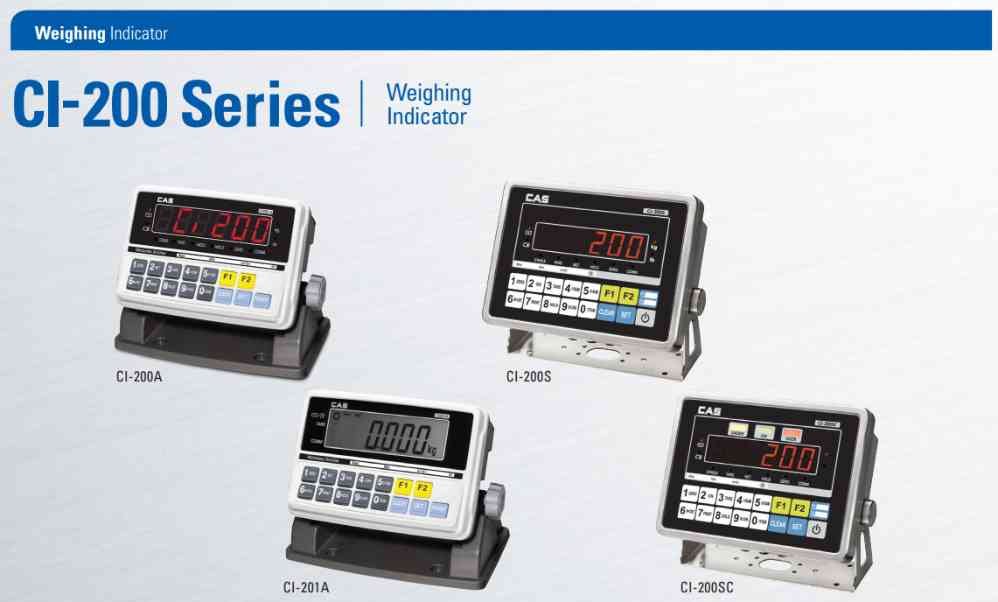
CAS CI-200 Indicator Calibration Procedure
Step 1:
Switch OFF the indicator.
Step 2:
Remove the legal seal if installed.
Step 3:
Press and hold the CAL S/W (Calibration Switch).
Step 4:
While holding the CAL S/W, switch ON the indicator.
Step 5:
Wait until Weight Setup Mode appears.
Step 6:
Select CAL 1 and set maximum capacity.
Step 7:
Configure division value and decimal point settings.
Step 8:
Enter CAL 3 (Weight Calibration).
Step 9:
Perform Zero Calibration with empty platform.
Step 10:
Enter the calibration weight value.
Step 11:
Place the certified calibration weight on the platform.
Step 12:
Perform Span Calibration.
Step 13:
Wait until calibration is successfully stored.
Step 14:
Return to weighing mode.
Step 15:
Verify accuracy using certified test weights.
Note:
Calibration settings may vary depending on CI-200A, CI-201A, CI-200S and CI-200SC versions.
Switch OFF the indicator.
Step 2:
Remove the legal seal if installed.
Step 3:
Press and hold the CAL S/W (Calibration Switch).
Step 4:
While holding the CAL S/W, switch ON the indicator.
Step 5:
Wait until Weight Setup Mode appears.
Step 6:
Select CAL 1 and set maximum capacity.
Step 7:
Configure division value and decimal point settings.
Step 8:
Enter CAL 3 (Weight Calibration).
Step 9:
Perform Zero Calibration with empty platform.
Step 10:
Enter the calibration weight value.
Step 11:
Place the certified calibration weight on the platform.
Step 12:
Perform Span Calibration.
Step 13:
Wait until calibration is successfully stored.
Step 14:
Return to weighing mode.
Step 15:
Verify accuracy using certified test weights.
Note:
Calibration settings may vary depending on CI-200A, CI-201A, CI-200S and CI-200SC versions.
Looking for a new weighing machine?
Upgrade your operations with our latest high-precision scales. We offer a wide catalog of reliable and certified machines.
Related Calibration Guides