How to Calibrate the Essae DS-252 Weighing Scale
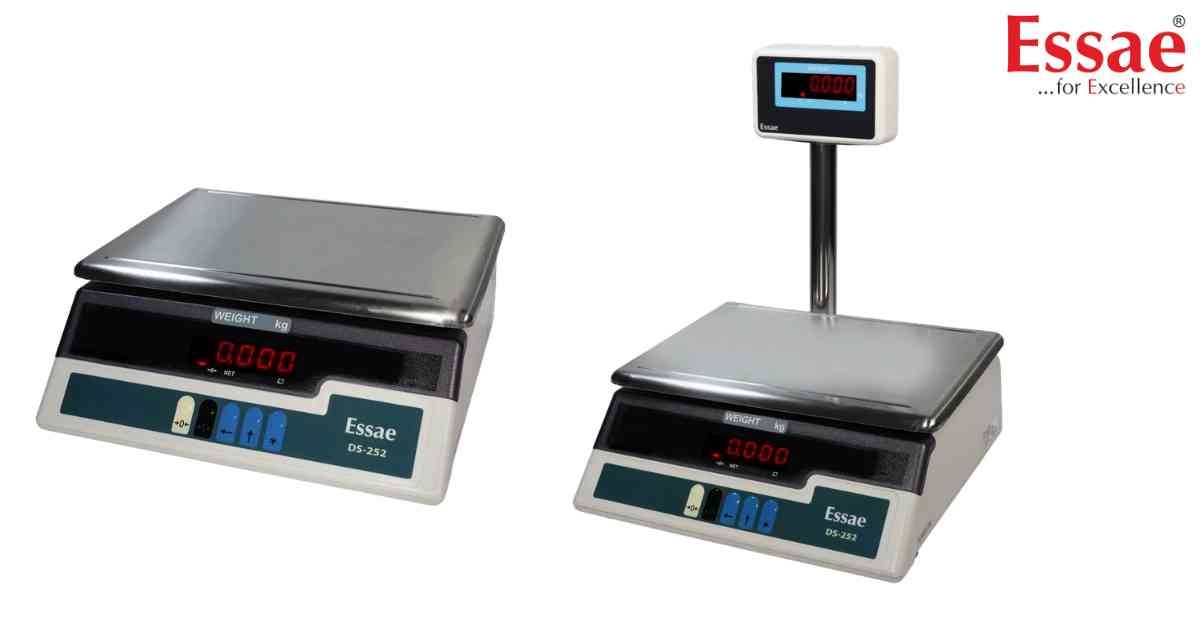
⚙️ Model Compatibility: Essae DS-252.
When the DS-252 begins showing inaccurate weights, it must undergo a span calibration using a certified physical test weight. Ensure the scale is placed on a perfectly level surface away from drafts and vibrations before beginning.
Step-by-Step Calibration:
1. Ensure the platter is completely empty. Turn the scale OFF.
2. Turn the scale ON. During the initial countdown sequence (999999 to 000000), press the calibration key combination. (Note: On most standard DS-252 firmwares, press and hold [REZERO] + [TARE] or [REZERO] + [1] + [4] + [1]).
3. The display will enter calibration mode and show "CAL".
4. Press the [ENTER] or [TARE] key to confirm entry.
5. The screen will prompt you to enter the calibration weight value. Use the numeric keypad (or the [↑] increment and [→] shift keys depending on the keypad layout) to enter the exact value of your test weight (e.g., 10.000 for 10kg).
6. Place the physical test weight precisely in the center of the platter.
7. Wait a few seconds for the internal reading to stabilize, then press the [ENTER] or [TARE] key.
8. The display will show "CAL END" or return directly to normal weighing mode.
9. Remove the weight, verify it returns to 0.000, and place the weight back on to confirm accuracy.
When the DS-252 begins showing inaccurate weights, it must undergo a span calibration using a certified physical test weight. Ensure the scale is placed on a perfectly level surface away from drafts and vibrations before beginning.
Step-by-Step Calibration:
1. Ensure the platter is completely empty. Turn the scale OFF.
2. Turn the scale ON. During the initial countdown sequence (999999 to 000000), press the calibration key combination. (Note: On most standard DS-252 firmwares, press and hold [REZERO] + [TARE] or [REZERO] + [1] + [4] + [1]).
3. The display will enter calibration mode and show "CAL".
4. Press the [ENTER] or [TARE] key to confirm entry.
5. The screen will prompt you to enter the calibration weight value. Use the numeric keypad (or the [↑] increment and [→] shift keys depending on the keypad layout) to enter the exact value of your test weight (e.g., 10.000 for 10kg).
6. Place the physical test weight precisely in the center of the platter.
7. Wait a few seconds for the internal reading to stabilize, then press the [ENTER] or [TARE] key.
8. The display will show "CAL END" or return directly to normal weighing mode.
9. Remove the weight, verify it returns to 0.000, and place the weight back on to confirm accuracy.
Looking for a new weighing machine?
Upgrade your operations with our latest high-precision scales. We offer a wide catalog of reliable and certified machines.
Related Calibration Guides
